

How to Set Up Klaviyo Flows for Shopify: The Complete Guide
 Ryan Kodzik
Klaviyo flows are automated email sequences triggered by customer actions, and they drive 20–30% of email revenue for most Shopify brands. Most stores set up the wrong flows first or configure them with weak trigger logic. This guide covers the 6 flows every DTC brand needs, how to configure each one, and what benchmarks to expect.
What Are Klaviyo Flows and How Are They Different From Campaigns?
Campaigns are one-time sends. You build a list, write an email, pick a send date, and it goes out once. Flows are different. They trigger automatically when a customer takes a specific action, and they run indefinitely without manual input.
That difference compounds over time. A campaign you sent in March is done. A welcome series you built in March is still running, still sending, still generating revenue in June. Flows build passively. Campaigns require ongoing effort. Both matter, but flows are the infrastructure. Campaigns are the programming that runs on top of it.
Which Klaviyo Flows Does Every Shopify Brand Need?
Welcome Series
Trigger: Customer subscribes to your list (sign-up form submit or Shopify list join). Timing: Email 1 immediately, Email 2 at 24 hours, Email 3 at 72 hours. Recommended email count: 3–5. Revenue benchmark: Welcome series consistently generate the highest revenue per recipient of any flow. Average open rates run 40–60% on Email 1.
Abandoned Cart
Trigger: Customer adds to cart and does not complete purchase. Timing: Email 1 within 1 hour, Email 2 at 24 hours, Email 3 at 72 hours. Recommended email count: 3 minimum, 4 if your AOV is above $75. Revenue benchmark: Abandoned cart typically drives 5–10% of total email revenue depending on your traffic volume.
Browse Abandonment
Trigger: Customer views a product page but does not add to cart. Timing: Email 1 within 4 hours, Email 2 at 24 hours. Recommended email count: 2. Note: This flow needs a filter that suppresses it when an abandoned cart flow is already triggered. Without that filter, customers get both, and the sequencing conflicts.
Post-Purchase (Split by Purchase History)
Trigger: Customer completes an order. Timing: Email 1 within 1 hour of purchase, Email 2 at 7 days, Email 3 at 21 days. Recommended email count: 3–4, split between first-time buyers and repeat purchasers using a conditional split. Purpose: First-time buyers get onboarding and product education. Repeat buyers get cross-sell and loyalty messaging. Running one sequence for both wastes the segmentation Klaviyo gives you for free.
Win-Back
Trigger: Customer has not purchased in 90, 120, or 180 days, depending on your average purchase frequency. Timing: 3-email sequence over 30 days. Recommended email count: 3. Note: Always include a suppression filter. If a customer purchases during the win-back sequence, they exit immediately. Without that logic, you send win-back emails to people who just bought.
Sunset/Suppression
Trigger: Customer has not opened or clicked any email in 90–120 days. Timing: 2-email sequence confirming intent, then suppress if no engagement. Purpose: Protecting your sender reputation and deliverability. A suppressed list with 50,000 engaged subscribers outperforms a bloated list with 200,000 disengaged ones.
How Do You Set Up Each Flow in Klaviyo?
Navigating to Flows
In your Klaviyo dashboard, go to Flows in the left sidebar, then click Create Flow in the top right. You’ll see two options: Browse Templates and Build From Scratch. Use Browse Templates for the welcome series, abandoned cart, and post-purchase flows. The templates are well-structured and save 30–45 minutes per flow. Use Build From Scratch for browse abandonment and win-back, where trigger logic and conditional splits require more customization.
Welcome Series Setup Trigger: Select “Metric” as your trigger type. Choose Subscribed to List and select your main list. If you use a sign-up form hosted in Klaviyo, you can also use Submitted Form as the trigger. Add a trigger filter to exclude anyone who has already placed an order (use Placed Order count is 0) if you want to keep this flow strictly for net new subscribers.
Flow filters to add: Suppress if unsubscribed. That’s it for a basic setup.
Time delays between emails: Set 24-hour delays using Klaviyo’s Time Delay action block. For Email 3, increase to 48–72 hours. Spacing matters. Sending three emails in 24 hours burns goodwill fast.
Abandoned Cart Setup Trigger: Select Metric and choose Started Checkout. This fires when a customer reaches checkout but does not complete it. Do not use Added to Cart as your trigger. Klaviyo’s checkout trigger fires later in the funnel and produces higher intent signals.
Trigger filter: Add Placed Order zero times since starting this flow. This prevents the sequence from continuing after a purchase. Without it, customers who convert on Email 1 receive Emails 2 and 3 anyway.
Time delays: Email 1 at 1 hour, Email 2 at 23 hours after Email 1 (nets to 24 hours total), Email 3 at 48 hours after Email 2.
Do not include a discount in Email 1. You’re recovering carts, not training customers to abandon on purpose. If you’re going to offer a discount, put it in Email 3 only.
Browse Abandonment Setup Trigger: Select Metric and choose Viewed Product. This triggers when a customer views a product page without adding to cart.
Critical flow filter: Add Placed Order zero times since starting this flow and Has not been in Abandoned Cart flow in the last 7 days. The second filter is what prevents overlap. If a customer viewed a product and then abandoned a cart, they should be in the abandoned cart sequence, not browse abandonment. Running both creates a confusing, overlapping email experience.
Time delays: Email 1 at 4 hours, Email 2 at 20 hours after Email 1.
Post-Purchase Setup Trigger: Placed Order metric.
This flow needs a conditional split immediately after the trigger.
Set it to check: Has the customer placed more than 1 order with you?
- If yes: route to repeat buyer sequence.
- If no: route to first-time buyer sequence.
First-time buyer sequence: Product education, usage tips, what to expect from the brand, soft cross-sell at Email 3. Repeat buyer sequence: Loyalty acknowledgment, cross-sell into adjacent products, referral ask.
Time delays: Email 1 at 1 hour, Email 2 at 7 days, Email 3 at 14 days, Email 4 at 30 days.
Win-Back Setup Trigger: Set this as a Metric-triggered flow based on Placed Order, but use the Flow Filter logic to target customers who have not placed an order in the last 90 days (or whatever your average purchase frequency warrants). Alternatively, build a segment of lapsed customers and use Added to Segment as the trigger.
Suppression logic: Add Has placed order zero times since starting this flow as a trigger filter. This is the most commonly missed step. Without it, customers who buy during a win-back sequence keep receiving win-back emails.
Time delays: Email 1 at Day 0, Email 2 at Day 7, Email 3 at Day 21.
Sunset Flow Setup Trigger: Build a segment of customers who have not opened or clicked any email in the past 90 days and have been subscribed for at least 90 days. Use Added to Segment as your trigger.
Sequence: Email 1 is a reconfirmation ask (“Do you still want to hear from us?”). Email 2 goes out 7 days later. If no engagement after Email 2, add an Update Email Subscription action block to suppress them.
What Open Rates and Revenue Should You Expect From Klaviyo Flows?
These benchmarks come from Klaviyo’s published data across their DTC merchant base. Use them to calibrate your setup, not to grade yourself after one week.
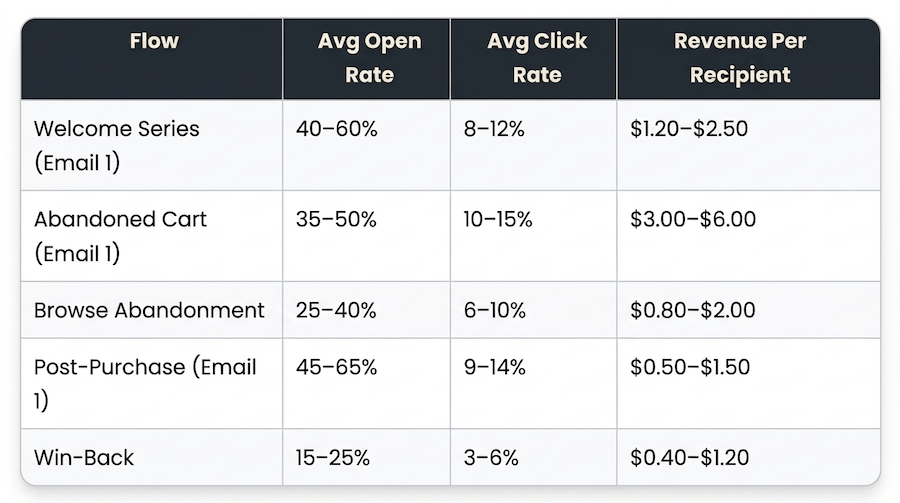
If your numbers are below the lower end of these ranges, the issue is usually one of three things: list quality, trigger configuration, or subject lines. Audit in that order before touching copy.
What Klaviyo Flow Setup Mistakes Kill Performance?
Targeting your entire list instead of segmenting by engagement
Flows should apply different suppression logic based on how recently someone engaged. Sending a welcome series to someone who subscribed 18 months ago and never opened is deliverability damage. Use engagement segments as flow filters from the start.
No suppression logic on win-back flows
This is the most common mistake we see in audits. A customer buys during a win-back sequence and still receives the remaining win-back emails because no one added the “placed order since starting this flow” filter. Fix this in every win-back flow before you turn it on.
Missing A/B tests on welcome series Email 1
Email 1 of your welcome series reaches subscribers at peak engagement. That’s the highest-value A/B test available to you in all of Klaviyo. Most brands never run one. Test subject lines first, then preview text, then send time. Run each test for at least 1,000 recipients before declaring a winner.
Trigger conflicts between browse abandonment and abandoned cart
Both flows can fire for the same customer on the same session. Without explicit filters excluding customers already in one flow from entering the other, you send 4–5 emails in 24 hours. Open rates crater and unsubscribes spike.
Post-purchase flow with no conditional split
First-time buyers and repeat buyers have different relationships with your brand. A generic post-purchase sequence that ignores that distinction leaves revenue on the table. The split takes 15 minutes to configure and immediately improves relevance.
When Should You Hire a Klaviyo Agency vs. Manage Flows In-House?
If you have 1–3 flows live and your email revenue is below 15% of total revenue, you probably have a configuration problem, not a resourcing problem. The core flows can be set up by a capable internal operator in 8–12 hours using Klaviyo’s templates. Start there.
The case for bringing in outside help gets clearer when you’re above $5M in revenue, have basic flows running, and are stuck between 12–18% email revenue contribution. At that point, the constraint is usually architecture: trigger conflicts, no suppression logic, missing conditional splits, and no A/B testing infrastructure. Those take longer to build correctly and require someone who has done it across multiple catalogs and traffic volumes.
We work with Shopify brands doing $5M or more that have the foundational flows in place and need the next level: advanced segmentation, A/B testing infrastructure, and flow architecture that scales as your catalog and customer base grow. If that’s where you are, talk to our team.
What Does a Klaviyo Flow Rebuild Actually Look Like?
One food and beverage brand we work with came in with two flows live: a welcome series and an abandoned cart. Email revenue was sitting at 12% of total revenue. The industry benchmark for a healthy DTC email program is 25–35%.
We audited the existing setup and found three problems: trigger conflicts between browse abandonment and abandoned cart were generating 5+ emails per session, there was no post-purchase sequence, and their list had no suppression logic. Roughly 40% of their subscribers had not opened an email in over 120 days.
We rebuilt the full 6-flow architecture with conditional splits by purchase history, added filter logic to eliminate trigger conflicts, and built a sunset flow that suppressed 22% of the list within the first 30 days. Deliverability improved immediately. Open rates recovered 8 points within 45 days.
Automated email revenue went from 12% to 27% of total revenue within 90 days of the new flows going live.
Frequently Asked Questions
What is the most important Klaviyo flow to set up first?
The welcome series. It reaches subscribers at peak engagement, when they’ve just expressed interest in your brand. Welcome series flows average 3x higher open rates than standard campaigns and typically generate the highest revenue per recipient of any automated sequence. Get this one right before building anything else.
How many emails should be in a Klaviyo abandoned cart flow?
Three emails minimum. Email 1 within 1 hour of abandonment, Email 2 at 24 hours, Email 3 at 72 hours. Adding a fourth email at 5–7 days recovers an additional 8–12% of abandons depending on your AOV. Do not put a discount in Email 1. Reserve it for Email 3 if you use one at all.
What is the difference between a Klaviyo flow and a Klaviyo campaign?
Flows are triggered automatically by a customer action: viewing a product, abandoning a cart, making a purchase. Campaigns are one-time sends to a list segment on a scheduled date. Flows generate revenue passively after you build them. Campaigns require active scheduling and ongoing execution.
How long does it take to set up Klaviyo flows for a Shopify store?
The 6 core flows take 8–12 hours to configure using Klaviyo’s pre-built templates. Custom flows with advanced segmentation, conditional splits, and A/B testing infrastructure take 20–40 hours. That estimate assumes someone who knows Klaviyo’s flow builder. Budget more time if it’s a first build.
How do I connect Klaviyo to Shopify?
Install the Klaviyo app from the Shopify App Store and authorize the integration. Klaviyo automatically syncs your customer data, order history, and product catalog. The sync takes 10–30 minutes for most stores. After it completes, verify three things: historical order data synced correctly, real-time event tracking is firing (test with a live product view), and your product feed is populated in Klaviyo’s catalog.
What open rate should I expect from a Klaviyo welcome series?
Email 1 should hit 40–60% for a healthy list. Below 35% usually means a list quality issue or weak subject line, not a flow configuration problem. Email 2 typically runs 25–35% and Email 3 runs 20–28%. If you’re below those numbers across the board, audit your list source and trigger timing before rewriting copy.
💡 Recommended Reading: Best Klaviyo Email Flows for DTC Brands
Working on this for your store? We build and optimize Klaviyo flow architecture for Shopify brands doing $5M or more. Talk to our team →
Ready to put this into practice?
We build and grow Shopify stores for DTC brands, from store design and development to Klaviyo and full-scale CRO programs. If you want to talk through what this looks like for your store, book a call. No pitch, just a conversation.
Book a discovery callRelated Articles